


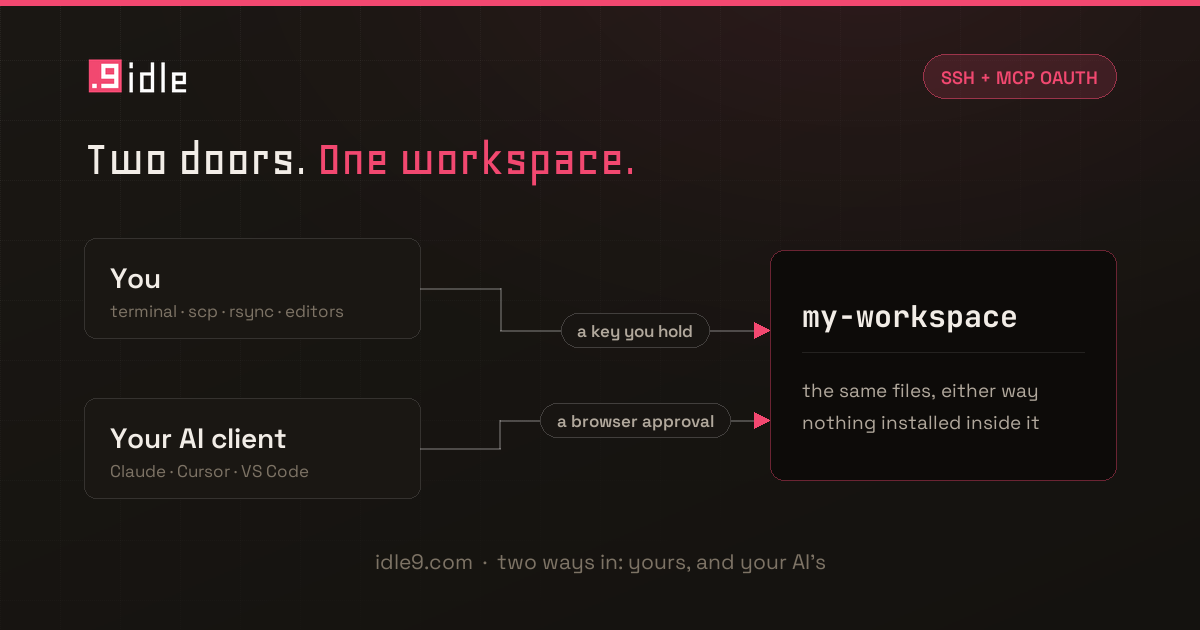
Two things landed this week that people have been asking for since launch. Neither one is flashy. Both of them make Idle9 feel a lot less like a beta and a lot more like infrastructure you can actually build on.
You can now SSH straight into your workspace. No more routing everything through your AI just to poke around, tail a log, or run a command by hand. One command on the SSH access page sets it up — it makes a key if you don't have one, installs the helper that carries the session, and writes the ~/.ssh/config block. Paste the public key it prints onto that page, and from then on it's ssh my-workspace: same filesystem, same packages, same environment your AI has been working in the whole time. scp, rsync and your editor's remote-host mode read the same config block, so those work too.
There's no sshd in your workspace and no authorized_keys file sitting on a disk you're root on. The session rides a WebSocket over the same TLS front door as everything else, and the node agent bridges it into your environment — which also means a restored snapshot can't carry a stale credential back in with it.
And MCP connections now support OAuth. Before this, connecting a client meant minting a token and pasting it into a config file, where it sat in plaintext for as long as that client existed. Now you paste the MCP URL into Claude, Cursor or VS Code, the client registers itself, and you approve it in the browser. Nothing is copied, nothing lands on disk, and disconnecting is a button next to the app's name instead of a hunt for a token nobody can identify.
Why this matters
Idle9 started as a place for your AI to live between sessions. SSH and OAuth are the first real steps toward it being a place you live too — where you can drop in manually when you want to, and where connecting a new tool doesn't mean handing it a secret to keep.
The fine print, minus the squinting
- SSH is included on every plan — no add-on. It does need an active subscription and an awake workspace: SSH won't wake a sleeping one for you, because a wake restores a whole filesystem and your ssh client would just sit there looking hung. Ask your AI to wake it, or hit the button in the dashboard.
- Only the public half of your key ever reaches us. Your private key never leaves your machine.
- Approved apps are listed on the MCP access page with their own Disconnect button. Cutting one off leaves everything else running.
- Tokens aren't going anywhere. They're still the right answer for a script, a CI job, or any client that can't open a browser — and if you're using one today, nothing about your setup changes.